Cyber: Essential Guide: Microsoft adds Windows protections for malicious Remote Desktop files
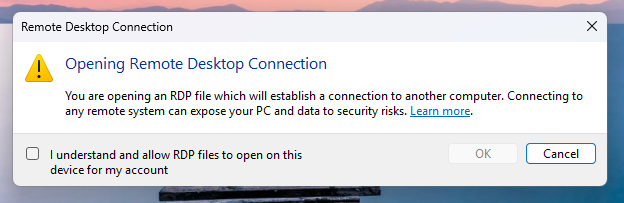
Microsoft has introduced new Windows protections to defend against phishing attacks that abuse Remote Desktop connection (.rdp) files, adding warnings and disabling risky shared resources by default. RDP files are commonly used in enterprise environments to connect to remote systems because admins can preconfigure them to automatically redirect local resources to the remote host. Threat actors have increasingly abused this functionality in phishing campaigns. The Russian state-sponsored APT29 hacking group has previously used rogue RDP files to remotely steal data and credentials from victims. When opened, these files can connect to attacker-controlled systems and redirect local drives to the connected device, allowing the attacker-controlled device to steal files and credentials stored on disk. They can also capture clipboard data, such as passwords or sensitive text, or redirect authentication mechanisms like smart cards or Windows Hello to impersonate users As part of the April 2026 cumulative updates for Windows 10 (KB5082200) and Windows 11 (KB5083769 and KB5082052), Microsoft has now released new protections to prevent malicious RDP connection files from being used on devices. "Malicious actors misuse this capability by sending RDP files through phishing emails," warns Microsoft. "When a victim opens the file, their device silently connects to a server controlled by the attacker and shares local resources, giving the attacker access to files, credentials, and more."
Source: BleepingComputer