Gaming: As An Ergonomic Keyboard Skeptic, I Made The Switch This Month And...
Keep up to date with the most important stories and the best deals, as picked by the PC Gamer team.
This week I've been: Continuing to exercise in VR, and playing The Seance of Blake Manor.
I don't think anyone would challenge me on the assertion that 'ergonomic keyboards look a little weird'. However, that's not the thing that has kept me away from them for, well, ever. It's that they feel weird. There are many types, of course, but mostly they're designed to keep your hand in the same position, and perhaps slightly elevated. They all come with their own learning curves, and I frankly just don't want to shape up how I type. I still use QWERTY, and I don't touch type. For shame, I know.
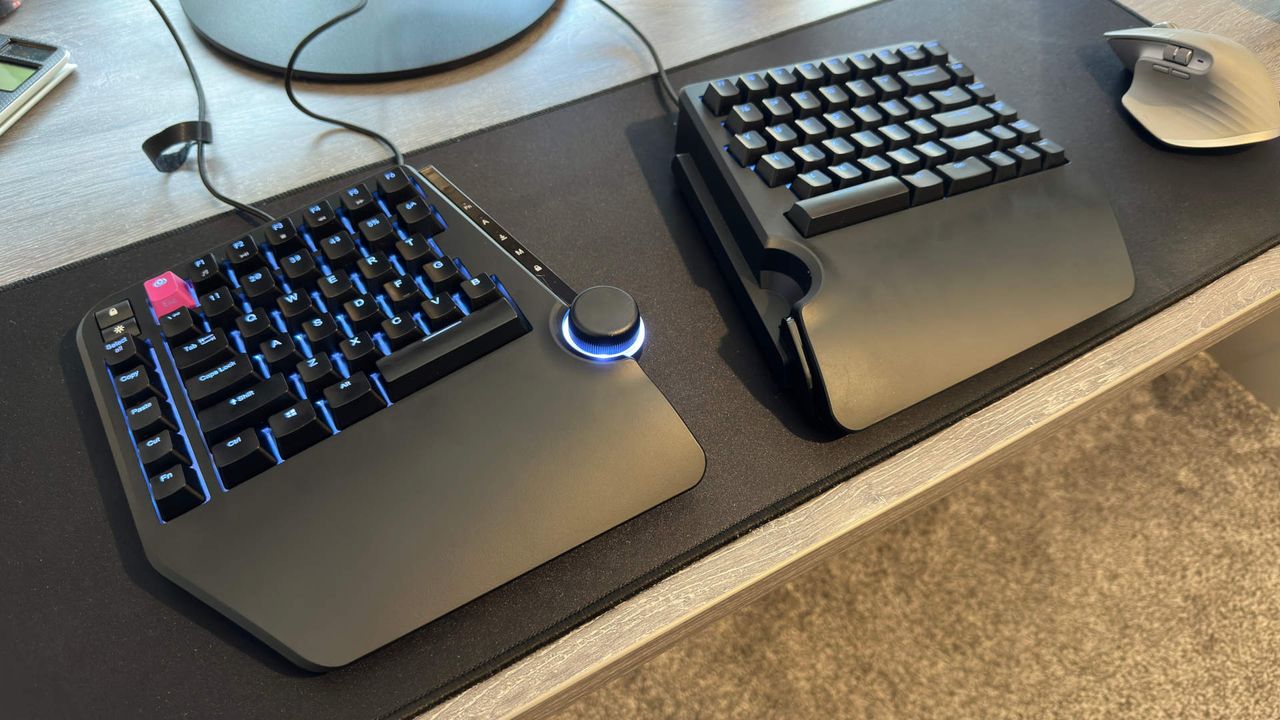
As you get more and more comfortable with hardware (and the marketing around said hardware), you are constantly bombarded with the benefits of buying new tech, and that's particularly true of things labelled 'ergonomic'. That's especially when they're as expensive as keyboards can get. But, I've decided to drop the cynicism a tad and actually get used to a keyboard, namely the Cloud Nine C959 Ergo TKL sat underneath my paws.
That's not to say there aren't benefits to swapping to a keyboard that aligns with how your arms traditionally sit. It's partly an acknowledgement that I do plenty of other things in unergonomic ways, and don't necessarily know if the swap will be worth the effort (and price).
Luckily, the PC Gamer office had the aforementioned C959 Ergo TKL in a closet, and I thought it would be the perfect time to blow the dust off the box, get it plugged in, and finally make the swap.
Other than the fact that you need to plug this keyboard in a very specific way, and the fact that drivers failed to update and entirely tanked the keyboard for a day, the swap was relatively easy when it comes to actually typing. My model has two halves that are split, but can be snapped together to feel closer to a traditional keyboard. Of course, you still get the benefits of an ergonomic keyboard, with a space in the middle so you don't have to cross your arms too much and wrist rests to keep your hands at an angle.
Some of the bigger hurdles in making the swap involve where I naturally place my palms and which keys I hit with which fingers. For instance, I'm very used to hitting the 'B' key with my right hand, as there are four keys to the left of it and two on the right, in a standard QWERTY layout. This means I often went to hit the 'B' and was greeted by empty air.
Learni
Source: PC Gamer